 MegaPok
If you're sending
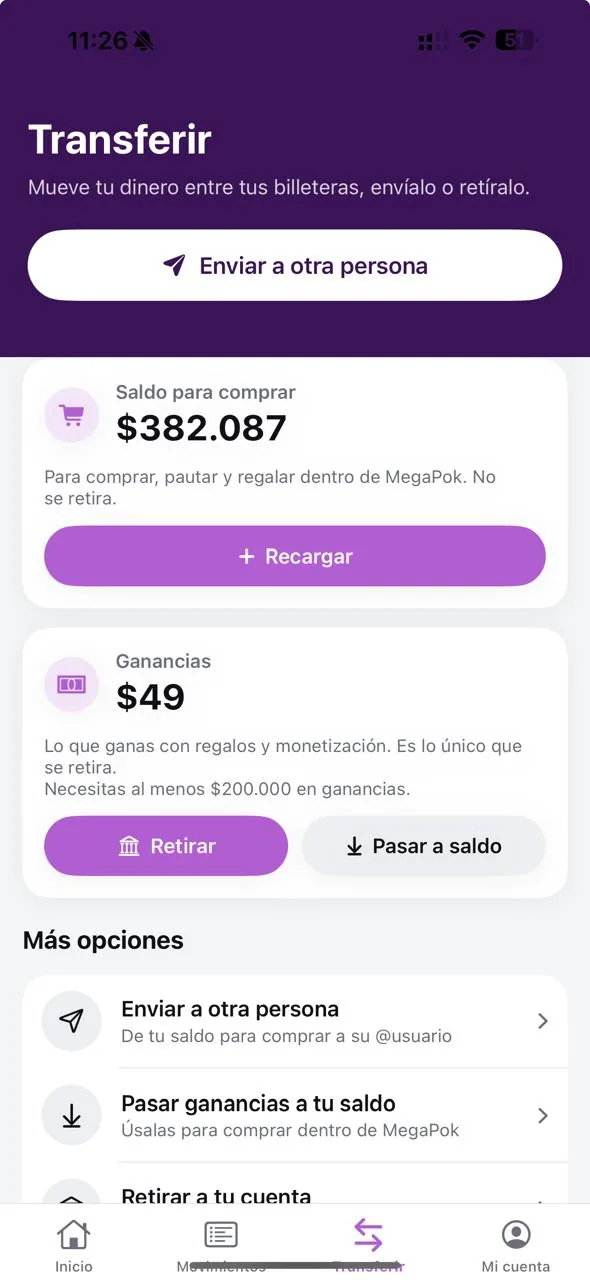
First you top up your wallet with a card, PSE or Nequi. When you top up, one credit equals one peso. Then, in a live stream or a conversation, you tap the gift icon, pick one and send it. The gift shows up on screen and is taken from your balance.
You can also top up someone else's account: on the top-up page you look up their account, choose the amount and pay. Handy if your mom lives in Rionegro and you don't want her fighting with a payment form.
If you're receiving
The gift is credited to your wallet right away. Not all of it stays with you: with no plan or with Basic you get 50 %, with Pro 60 % and with Gold 70 %. The rest covers running the platform.
What you earn is kept apart from your spending balance. From the wallet you can move it to your balance to spend in the app, send it to someone else or request a withdrawal if you're an adult.
Where you send them
In live streams, where they're used the most, and in chats. It's all one system: the balance you send gifts with is the same one you use to pay for a delivery or a plan.
- Top upCard, PSE or Nequi; also from megapok.com without signing in.
- Pick a giftIn the live stream or chat, tap the gift icon.
- Send itIt comes out of your balance and reaches the other person.